- Instant delivery after payment
- Cfx.re escrow protected
- Free lifetime updates
- Discord support included
Woozy Multicharacter
Video Showcase

Make character selection part of the roleplay.
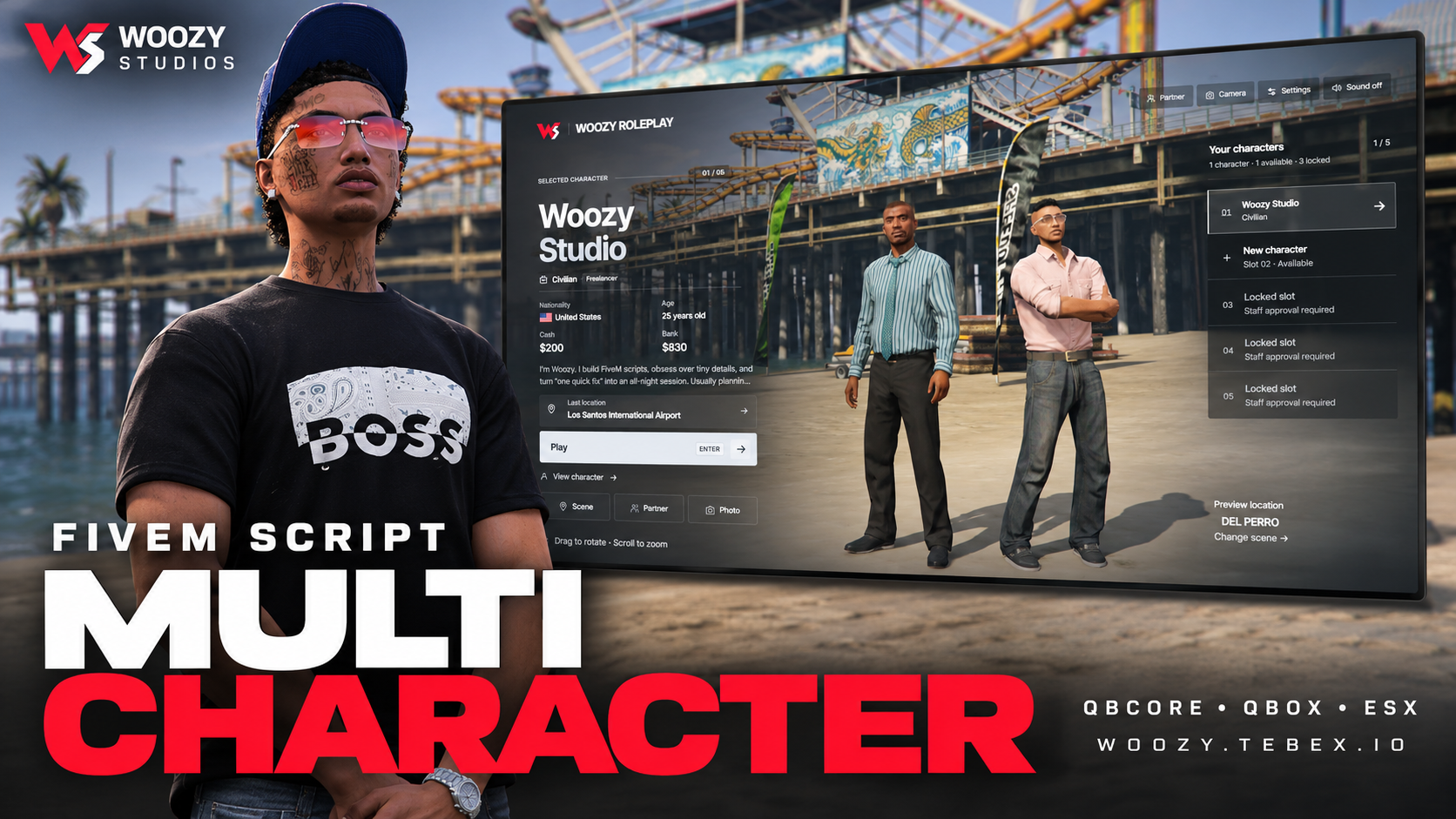
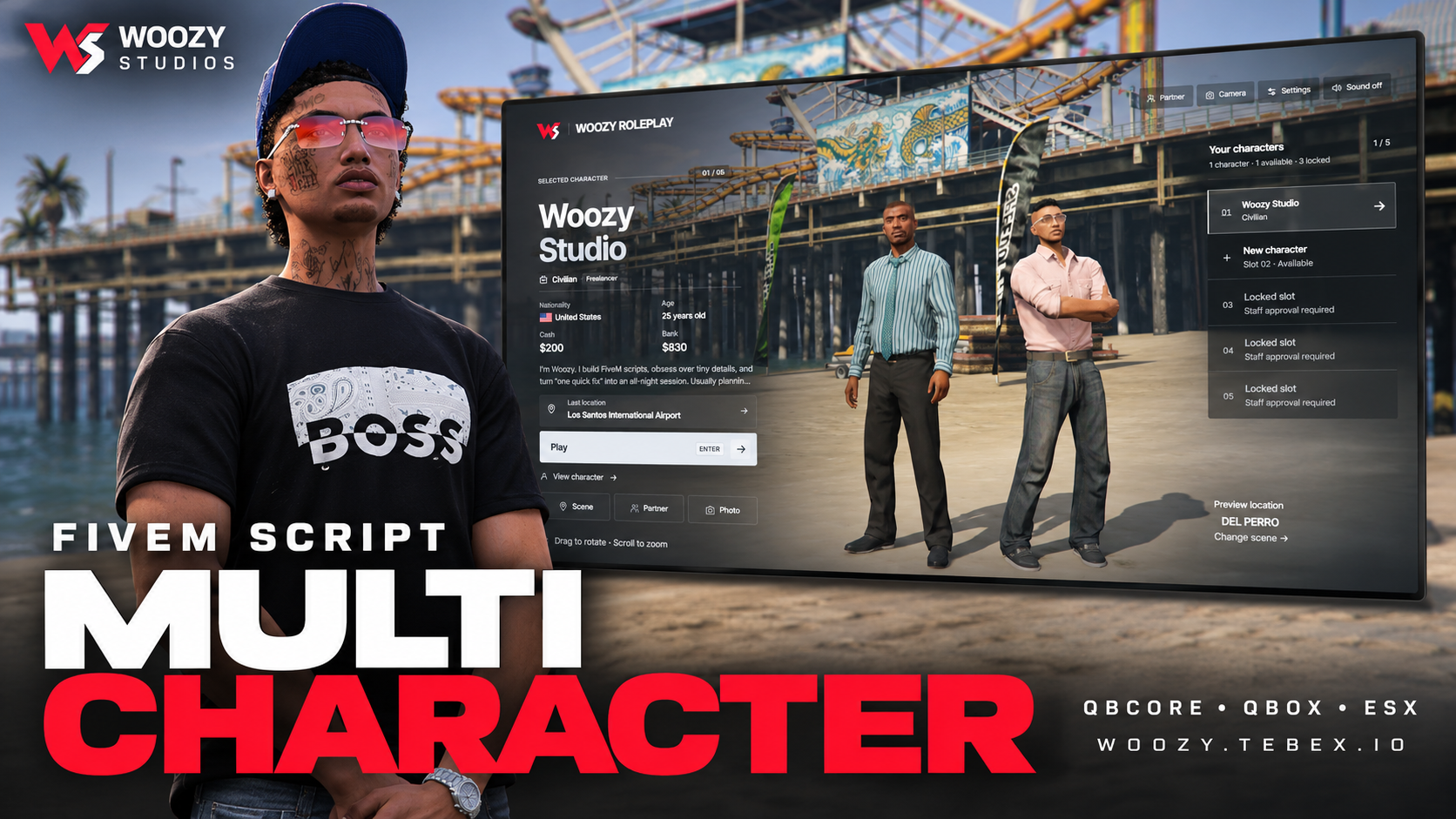
Give players more than a list of names. Woozy Multicharacter brings their identities into live GTA scenes, lets them share the frame with an accepted partner, and adds personal touches such as a drawn signature and a unique RP fingerprint record. Set the weather, choose a pose, frame a photo, and return to the city from your saved location.
QBCore · Qbox · ESX Legacy
13+ appearance integration options · 4 apartment/housing routes · 12 included locale files
Edition: Open Source | Version: 1.0.0
✅ Character Selection & Identity
- Live character previews: View your selected character in a configurable game-world scene, with their saved appearance supplied by your configured clothing resource.
- Detailed identity panel: Present the character's name, job, rank, nationality, age, backstory and last location. Open their dossier for further identity and account details.
- Character registration: Enter a first and last name, date of birth, gender and nationality, with optional height and backstory fields. Nationality selection includes searchable countries and flag assets.
- Personal signatures: Draw a signature directly on the registration pad. A notepad-writing animation with a pencil and notepad accompanies the signing step.
- Unique RP fingerprint records: Complete a hold-to-confirm scanner interaction and receive a unique fictional fingerprint identifier for that character. View saved registration records in the dossier.
- Flexible verification: Enable signature and fingerprint options independently, allow both, or disable the verification step.
- Controlled character slots: Offer the first character by default and manage additional slots through staff permissions and persistent account-based grants.
- Confirmed deletion: Require the character's first name before sending a deletion request.
🤝 Partner System
Bring another character into your selection scene through an invitation-and-acceptance flow. Once a link is accepted, a local preview of that character can appear alongside yours with their saved appearance.
- Partner search, incoming and sent invitation views.
- Persistent character links with acceptance and unlink controls.
- Paired scene choices, including a handshake, relaxed poses and shared activities.
- Optional random paired poses when entering the selector, with manual selection during the session.
- Show or hide the companion and use framing that accommodates both characters.
- Optional NPC demo commands for recording or testing without a second player.
The partner is a scene preview: the real player is not teleported or controlled. Displaying their saved appearance requires a compatible ped-targeted appearance adapter; see the integration notes below.
🎬 Scenes, Atmosphere & Photo Mode
- Five configurable scene presets: Del Perro, Legion Square, Sandy Shores Airfield, Vinewood After Hours and Route 68 Rideout, including vehicle and motorcycle backdrops.
- Scenic registration: A moving in-game view of the illuminated Del Perro pier provides a backdrop to character creation, with a character-preview view available.
- Weather selection: Clear, Sunshine, Clouds, Overcast, Rain, Storm, Fog and Snow, plus independent hour and minute controls.
- Eight visual filters: Original, Vivid, Noir, Punch, Soft, Focus, Lift and Low key.
- Selectable activities: Relaxed, confident and casual poses alongside activities such as using a phone, smoking or holding a drink.
- Four framing presets: Showcase, Full body, Portrait and Outfit detail.
- Photo Mode: Adjust camera orbit, elevation, distance and lens; use drag and scroll controls, then hide the interface for a clean screenshot.
- Presentation preferences: Cinematic bars, control hints, privacy settings and a performance mode that reduces optional scene effects.
Selection weather and time are local preview settings. Scene positions, vehicles, lighting and camera settings can be adjusted for your server's map.
🎵 Music & Scene Lyrics
Players can load a supported music link through the Music URL field, manage playback and opt into synchronized text placed in the scene behind their character. Timed lyrics follow the track's playback position, including pauses and seeking.
- Custom track links, playback controls and saved music preferences.
- Automatic track metadata and timed-lyric lookup where available.
- Optional scene lyrics with current and surrounding lines.
- Manual LRC import and a configurable default soundtrack.
Track availability: Custom link playback uses supported YouTube links and remains subject to the provider's playback and embedding restrictions. Automatic timed lyrics depend on catalogue coverage; not every song has synchronized lyrics. Music and lyrics used in the showcase are not a bundled commercial music library.
📍 Spawn & Apartment Options
Return existing characters to their saved last location, configure the first spawn for new identities, or enable additional public destinations individually. Keep last location as the only option if that suits your server.
Starter-apartment integration routes are included for:
- qb-apartments
- ps-housing
- qbx_properties
- 0r-apartment
Apartment entry is handed to the installed provider. qb-apartments and ps-housing routes require qb-spawn; qbx_properties uses the Qbox flow. 0r-apartment must be selected explicitly and matched to your installed version. A configurable custom adapter is available for other housing or external spawn flows.
👕 13+ Clothing & Appearance Integration Options
The package includes adapter routes for all of the following:
- illenium-appearance
- fivem-appearance
- qb-clothing
- esx_skin / skinchanger
- bl_appearance
- rcore_clothing
- origen_clothing
- tgiann-clothing
- 0r-clothing
- bs-appearance
- onex-creation
- crm-appearance
- p_appearance
- raid_clothes
- ak47_appearance
Compatibility: These are implemented integration routes, not a guarantee that every provider version supports every framework or feature without configuration. Match the creator, appearance storage and adapter settings to your installed resources.
Partner appearance: Built-in ped-targeted routes are provided for illenium-appearance, fivem-appearance, bl_appearance, rcore_clothing, origen_clothing and qb-clothing, subject to the provider's supported framework and storage setup. Other providers need a compatible custom ped-targeted adapter. Player-only skinchanger calls are not used on partner NPCs.
Specific setup notes: Upstream fivem-appearance requires a configured persistence bridge because it does not include its own database system. Qbox with illenium-appearance requires the appearance resource's QB compatibility bridge. Closed-source provider APIs may vary by version.
🌍 Languages & Customization
12 locale files included: English, Turkish, Azerbaijani, Spanish, Brazilian Portuguese, French, German, Russian, Arabic, Simplified Chinese, Polish and Italian.
Choose the locale in config.lua and edit the supplied translations. Missing translated phrases fall back to English; some interface labels currently remain in English.
Configure server branding, character limits, permissions, spawn policy, scenes, camera settings, poses, weather presets, music, verification and integration hooks. config.lua and the locale files remain editable in the Escrow edition. Standard configuration does not require editing protected core files.
⚙️ Requirements & Installation
- A FiveM server running QBCore, Qbox or ESX Legacy.
- ox_lib and oxmysql.
- A compatible appearance/clothing resource configured for your framework.
- The relevant housing resources and dependencies if apartment entry is enabled.
Install the dependencies first, configure the resource and use the included README and SQL files. Disable competing character selectors, including Qbox's built-in selector when applicable. ESX requires its multicharacter mode and matching character identifiers.
Third-party frameworks, clothing systems, housing systems and custom map assets are separate resources and are not included. Fingerprint records are fictional roleplay identifiers, not real biometric scans; external MDT integration is not automatic. Check your specific framework/provider combination before deploying to a live server.
📦 This Edition
Open Source edition: Includes readable Lua and JavaScript source for custom development, alongside the configuration and locale files. An Escrow edition is also available separately. Third-party resources retain their own licensing and access rules.
📞 Support & Community
Questions about your framework or clothing setup? Contact Woozy Studios with the resource names and versions you use.
FREQUENTLY ASKED QUESTIONS
Find answers to common questions about our FiveM scripts and Tebex checkout.
RECENT PAYMENTS
Trusted by our community with 150+ successful sales worldwide.