
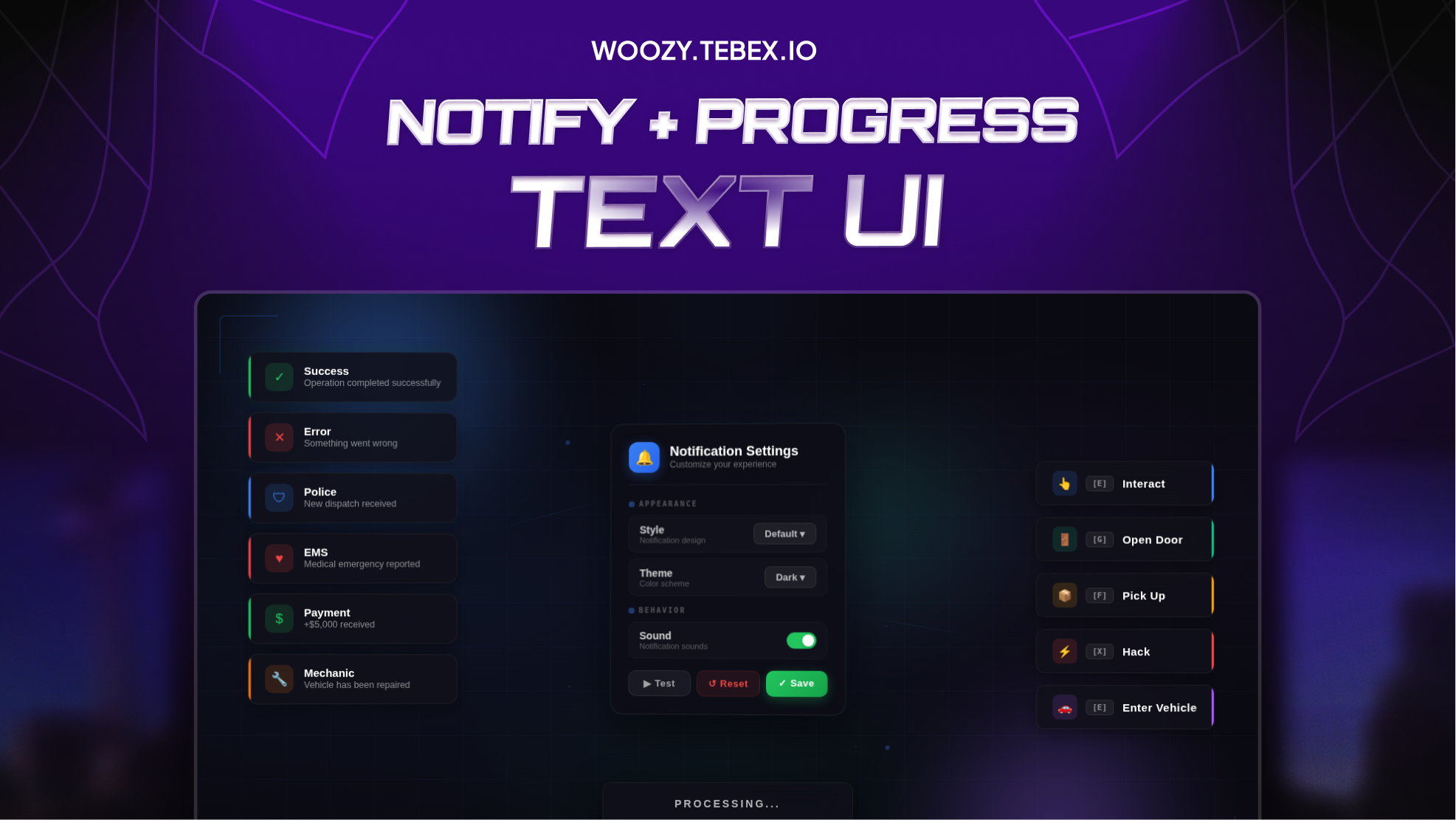
Woozy Studio - Notify & Progress & Text UI
9.99 USD
- Instant delivery after payment
- Cfx.re escrow protected
- Free lifetime updates
- Discord support included
Woozy Studio — Notify, Progress & Text UI
A modern notification, progress bar, and text UI system for FiveM servers.
Clean design, smooth animations, and full customization for your players.
Features
- Premium Notifications: multiple styles included (Default, Glass, Minimal, Rounded).
- Fully Customizable: dark and light themes, custom icons, and sounds.
- Progress Bars: linear and circular progress panels with real-time updates.
- Modern Text UI: clean interface with size and position options.
- In-Game Settings: players can change style, position, size, duration, sound, and more from the menu.
- Optimized: 0.00 ms idle usage.
- Easy Setup: plug & play install + detailed documentation.
Framework Support
- QBCore
- ESX
- Qbox / qbx_core
- ox_lib integration
- Fully standalone exports for custom scripts
Important: This is the Escrow version — protected with FiveM Asset Escrow. Easy config setup. No code access required.
Support & Community
Join DiscordFREQUENTLY ASKED QUESTIONS
Find answers to common questions about our FiveM scripts and Tebex checkout.
Are your FiveM scripts compatible with ESX, QBCore, and other popular frameworks?
Absolutely! Most of our premium FiveM scripts are designed for broad compatibility, especially with leading frameworks like ESX (ExtendedServer) and QBCore.
How do I install Woozy Studio scripts?
Download from your Tebex purchases, extract the folder into resources, add ensure script_name to server.cfg, then restart the server (or start the resource).
What payment methods do you accept?
Payments are handled by Tebex (cards, PayPal, and regional methods depending on your location).
Are your scripts secure / escrow protected?
Yes. Our assets are delivered through CFX/Tebex systems with ownership validation. Don’t share your account or files.
Do you provide updates?
Yes. Updates are published on Tebex. Re-download the latest version from your purchase page and replace the old files (keep your config backups).
Is support available?
Yes. Join our Discord for support, or contact us through Tebex support options with your purchase details.
Can I customize the scripts?
Most scripts are config-driven. You can change settings in the config files. Editing core encrypted/escrow files may break support.
What are the dependencies?
Dependencies are listed on each product page (e.g. ox_lib, ox_inventory, QB/ESX). Install them before starting the script.
What is your refund policy?
Digital products follow Tebex refund rules. If something doesn’t work, open a support ticket first with errors/screenshots — we’ll help fix it.
Can I use one purchase on multiple servers?
Licenses are for the purchasing CFX account / allowed servers under Tebex terms. Sharing or reselling is not allowed.
RECENT PAYMENTS
Trusted by our community with 150+ successful sales worldwide.

Whip024
Woozy Studio — Advanced Drug Phone
45.72 USD

vetemchf
Woozy Studio - Graffiti Script V1
15.99 USD

ICON_Roleplay
Woozy Studio - Graffiti Script V1
19.19 USD

Showtime_La
Woozy Studio - Graffiti Script V1
15.99 USD

Depth_RP
Woozy — Advanced Graffiti System V2
29.22 USD

Damstad
Woozy Studio — Graffiti System V2
76.22 USD
Filou_Lucas
Woozy Studio - Graffiti Script V1
19.19 USD


